Garuda Stream Hub
Low-Latency Linux Screen Mirroring & Multi-Track Streaming Suite
Project Overview
Garuda Stream Hub is an ultra-low latency streaming utility designed for mobile gaming (BGMI, PUBG Mobile, Free Fire) on Garuda Linux (Arch-based) and Android. It combines native C++ performance, multi-threaded PyQt6 UI, PipeWire audio isolation, and hardware-accelerated video streaming into a single one-tap control interface.
App Screenshot
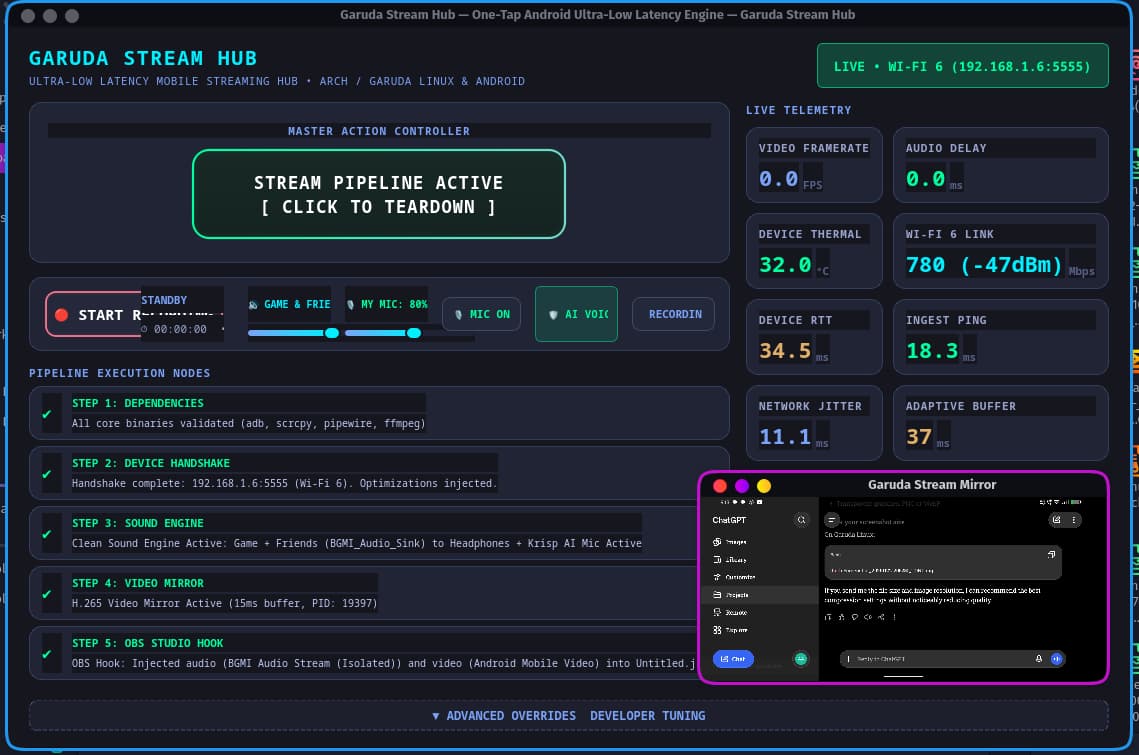
Key Features
1. Zero-Config Device Hook & Android Optimization
- Auto Wireless Discovery: Discovers devices over Wi-Fi 6/5GHz TCP/IP with instant USB 3.2 fallback
- Auto USB-to-Wi-Fi Promotion: Automatically promotes connected USB devices to TCP:5555 Wi-Fi link
- Android Performance Injection: Display stay-alive during streaming (stay_on_while_plugged_in 3), AOT package pre-compilation for gaming apps (zero frame drops), Battery saver toggle and Game Driver performance mode engagement
2. Advanced Audio Multiplexing ("The Mic Bug Fixer")
- Native PipeWire Virtual Sink: Creates isolated BGMI_Audio_Sink audio cable
- Dual-Channel Splitting: Game audio + teammates' voices isolated to virtual sink, Zero-latency loopback to physical headphones, PC desktop audio (Discord, Spotify) separated from OBS stream, OBS captures exclusively BGMI_Audio_Sink.monitor
3. Studio Multi-Track Recording Engine
- 1-Tap Direct Recording: Start/stop recordings directly from UI
- Synchronized Multi-Track MP4 Output: Stream 1: Master Mix (Game + Friends + Mic), Stream 2: Game & Friends Isolated, Stream 3: Player Mic Isolated (for professional editing)
- Real-time Audio Mix Controls: Volume sliders (0-150%) with mute toggle
- Automatic Duplex Mic Activation: Auto-engages mic profiles on Garuda Linux cards
- Output: ~/Videos/Recordings/GameRecording_
.mp4
4. Ultra-Low Latency Video Processing
- Sub-10ms Framerate Engine: scrcpy 5.0+ with H.265 (HEVC) hardware encoding
- Qualcomm Hardware Encoding: c2.qti.hevc.encoder on Snapdragon
- AMD VAAPI Decoding: Hardware-accelerated decoding on Garuda Linux
- Adaptive Buffer Controller: Real-time jitter sentinel (15ms buffer)
5. Automated Linux OS Optimization
- Process Priority Overrides: Elevates scrcpy/OBS priority (renice -10)
- OBS Studio Scene Injector: Auto-backups and injects audio/video capture sources
- System Performance Tuning: Sysctl performance injection
6. High-Performance Native C++ Telemetry
- Non-blocking socket ping sentinel for phone RTT and CDN latency
- RFC 3550 Jitter variance calculation
- Direct /proc watcher for CPU/memory tracking (zero overhead)
7. Modern UI Architecture (Garuda Neon Theme)
- Master Button: Animated neon button with pulse animations (Idle/Initializing/Live/Error states)
- Telemetry HUD: Live readout cards for FPS, Audio Delay, Thermal, Wi-Fi Speed, Ping, Jitter Buffer
- Pipeline Execution Nodes: 5 live step progress indicators
- Advanced Overrides Drawer: Real-time adjustment of bitrate, codecs, buffer sizes, V4L2 camera toggles
Technology Stack
Architecture Highlights
- Modular Design: Separated concerns across android/, audio/, video/, obs/, recorder/, core/, ui/, and native/ modules
- Multi-threading: Concurrent audio, video, and telemetry processing
- Hardware Acceleration: Leverages Qualcomm HEVC encoder and AMD VAAPI
- Real-time Telemetry: Sub-millisecond latency monitoring
- Cross-platform Audio: PipeWire modern audio stack with PulseAudio fallback
Target Use Case
Professional mobile game streamers requiring studio-quality multi-track recording with ultra-low latency, specifically optimized for Garuda Linux (Arch) and Android gaming ecosystem.